
Here’s a complete, detailed guide on how to indent a paragraph in HTML, including multiple methods using CSS, HTML entities, and best practices.
In this article:
1. Understanding Paragraph Indentation
- Indentation means adding horizontal space at the start of a paragraph.
- It improves readability, especially in long texts like essays, articles, or books.
- Browsers do not automatically indent paragraphs unless styled with CSS.
2. Using CSS text-indent Property
The text-indent property is designed to indent the first line of a paragraph.
Syntax:
p {
    text-indent: 50px; /* Indent first line by 50 pixels */
}
Example:
<p style="text-indent: 50px;">
This is an indented paragraph. The first line starts 50 pixels from the left.
</p>
px→ pixelsem→ relative to font size (1em = font-size)%→ percentage of container width
2.1 Using Relative Units (Responsive)
<p style="text-indent: 2em;">
This paragraph is indented by 2em (relative to font size).
</p>
- Keeps indentation proportional to text size
2.2 Internal CSS for Multiple Paragraphs
<head>
<style>
p {
    text-indent: 2em;
    line-height: 1.6; /* improves readability */
}
</style>
</head>
<body>
<p>First paragraph with indentation.</p>
<p>Second paragraph with consistent indentation.</p>
</body>
- Applies to all
<p>elements on the page
3. Using Non-breaking Spaces ( ) (Not Recommended)
You can manually insert spaces using :
<p> This paragraph is indented using non-breaking spaces.</p>
Disadvantages:
- Not flexible or maintainable
- Does not scale with font size or responsive layouts
- Best practice: use CSS
text-indent
4. Indenting Multiple Lines
By default, text-indent only affects the first line.
- To indent all lines, use padding or margin:
p {
    padding-left: 30px; /* indent all lines */
}
<p>This entire paragraph is pushed to the right by 30px.
All lines are indented, not just the first line.</p>
margin-leftalso works similarly:
p {
    margin-left: 2em;
}
5. Hanging Indent
- Sometimes used in bibliographies or lists
- First line starts normally, subsequent lines are indented
p {
    text-indent: -1.5em; /* negative first-line indent */
    padding-left: 2em;    /* indent for all lines */
}
<p>
This is a hanging indent paragraph. The first line is flush left, but all other lines are indented.
</p>
6. Using Classes for Selective Indentation
<p class="indented">This paragraph is indented.</p>
<p>This paragraph is normal.</p>

<style>
.indented {
    text-indent: 2em;
}
</style>
- Useful if not all paragraphs should be indented
7. Full Example
<!DOCTYPE html>
<html lang="en">
<head>
<meta charset="UTF-8">
<title>Paragraph Indentation Example</title>
<style>
p {
    line-height: 1.6;
    margin-bottom: 15px;
}
.indent-first-line {
    text-indent: 2em; /* indent first line only */
}
.indent-all {
    padding-left: 2em; /* indent entire paragraph */
}
</style>
</head>
<body>

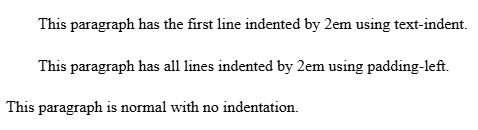
<p class="indent-first-line">This paragraph has the first line indented by 2em using text-indent.</p>

<p class="indent-all">This paragraph has all lines indented by 2em using padding-left.</p>

<p>This paragraph is normal with no indentation.</p>

</body>
</html>
Output:
8. Summary
| Method | How to Use | Notes |
|---|---|---|
CSS text-indent | p { text-indent: 2em; } | Best practice for first-line indentation |
CSS padding-left or margin-left | p { padding-left: 2em; } | Indents all lines |
Non-breaking spaces | | Not recommended, manual and not scalable |
| Classes | <p class="indented"> | Apply indentation selectively |
| Hanging indent | text-indent: -1.5em; padding-left: 2em; | First line flush, rest indented |
✅ Best Practice: Use CSS text-indent for first-line indentation and padding/margin-left for all-line indentation. Avoid using manual spaces ( ).
Other Courses: