
Here’s a complete, detailed guide on how to add CSS to style comments on an HTML page. Since comments (<!-- ... -->) in HTML are ignored by the browser, they cannot be styled directly. But you can create visible comment-like sections in HTML that mimic comments and apply CSS to them.
1. Understanding HTML Comments vs Visible Comments
- HTML comments:
<!-- This is a comment -->- Invisible on the page
- Cannot be styled with CSS
- Visible comments: Use elements like
<div>or<span>to display text that looks like a comment- Can be styled using CSS
2. Creating a Visible Comment Section
<div class="comment">
    This is a visible comment on the page.
</div>
div.commentacts like a comment box that users can see- Now we can apply CSS styles to it
3. Adding CSS to Style the Comment
<style>
.comment {
    background-color: #f0f0f0; /* light gray background */
    color: #555;               /* text color */
    font-style: italic;        /* italic text like a note */
    border-left: 4px solid #007BFF; /* blue bar on the left */
    padding: 10px;
    margin: 10px 0;
    font-family: Arial, sans-serif;
}
</style>
Full HTML Example:
<!DOCTYPE html>
<html lang="en">
<head>
<meta charset="UTF-8">
<title>Styled Comment Example</title>
<style>
.comment {
    background-color: #f0f0f0;
    color: #555;
    font-style: italic;
    border-left: 4px solid #007BFF;
    padding: 10px;
    margin: 10px 0;
    font-family: Arial, sans-serif;
}
</style>
</head>
<body>

<h1>Page Title</h1>

<p>This is a paragraph on the page.</p>

<div class="comment">
    <!-- This is an HTML comment, invisible to users -->
    This is a visible comment styled with CSS.
</div>

<p>Another paragraph below the comment.</p>

</body>
</html>
Output:
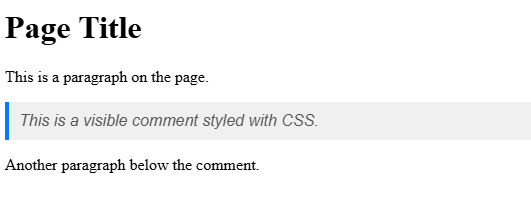
Features:
- The
<!-- ... -->comment is still in the source but not visible. - The
<div class="comment">displays a styled, visible comment.
4. Alternative: Inline Span for Comments
<p>This is a paragraph with a <span class="comment-inline">inline comment</span> inside it.</p>

<style>
.comment-inline {
    color: #888;
    font-style: italic;
    background-color: #f9f9f9;
    padding: 2px 4px;
    border-radius: 3px;
}
</style>
Output:
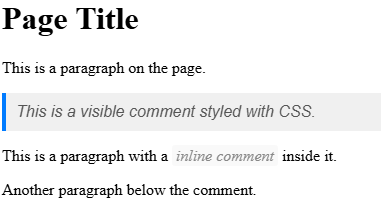
- Good for small notes inside text
5. Summary
| Method | Description | Notes |
|---|---|---|
HTML <!-- ... --> | Standard comment | Invisible, cannot be styled |
<div class="comment"> | Visible, block-level comment | Can be styled with CSS |
<span class="comment-inline"> | Inline visible comment | Can style small notes in text |
| CSS styling | background-color, border, font-style, color, padding, margin | Used to make comment visually distinct |
✅ Best Practice:
- Use HTML comments (
<!-- ... -->) for developer notes and debugging. - Use styled
<div>or<span>for visible comments or notes on the page.
Other Courses: