
Here’s a complete, detailed explanation of table headers (<th>) in HTML, including their purpose, usage, attributes, styling, and best practices.
1. What is a Table Header in HTML?
- A table header is a cell in an HTML table that defines the heading for a row or column.
- Represented by the
<th>element. - Helps structure tabular data and improves accessibility for screen readers.
- Text in
<th>is bold and centered by default.
2. Syntax of <th>
<th>Header Text</th>
- Must be used inside a
<tr>(table row) element. - Can appear in table head
<thead>or table body<tbody>.
Example:
<table border="1">
  <tr>
    <th>Name</th>
    <th>Age</th>
    <th>City</th>
  </tr>
</table>
- Output: A table with three column headers: Name, Age, City
3. Placement of <th>
3.1 Column Headers (default)
- Placed at the top row to describe columns.
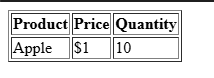
<table border="1">
  <thead>
    <tr>
      <th>Product</th>
      <th>Price</th>
      <th>Quantity</th>
    </tr>
  </thead>
  <tbody>
    <tr>
      <td>Apple</td>
      <td>$1</td>
      <td>10</td>
    </tr>
  </tbody>
</table>
Output:
3.2 Row Headers
- Placed at the first cell of each row to describe the row.
<table border="1">
  <tr>
    <th>Monday</th>
    <td>Math</td>
    <td>English</td>
  </tr>
  <tr>
    <th>Tuesday</th>
    <td>Science</td>
    <td>History</td>
  </tr>
</table>
Output:

4. Attributes of <th>
| Attribute | Description | Example |
|---|---|---|
scope | Defines whether the header is for a row, column, or group | <th scope="col">Name</th> |
colspan | Spans the header across multiple columns | <th colspan="2">Full Name</th> |
rowspan | Spans the header across multiple rows | <th rowspan="2">Weekday</th> |
abbr | Short abbreviation for long header (accessibility) | <th abbr="International Business Machines">IBM</th> |
| Global attributes | id, class, style, etc. | <th class="highlight">Age</th> |
4.1 Scope Attribute
- Helps screen readers understand table structure:
<th scope="col">Name</th> <!-- Column header -->
<th scope="row">Monday</th> <!-- Row header -->
col→ header for columnrow→ header for rowcolgroup→ header for column grouprowgroup→ header for row group
4.2 Colspan and Rowspan
<table border="1">
  <tr>
    <th colspan="2">Full Name</th>
    <th>Age</th>
  </tr>
  <tr>
    <td>John</td>
    <td>Doe</td>
    <td>25</td>
  </tr>
</table>
colspan="2"→ Header spans two columns
5. Styling <th> with CSS
Default <th> style: bold and centered
Custom styles example:
<style>
th {
    background-color: #007BFF;
    color: white;
    padding: 10px;
    text-align: left; /* override center */
    font-size: 16px;
}
td {
    padding: 10px;
}
</style>
- Can change background, text color, alignment, font, padding
- Can use classes for multiple header styles:
<th class="highlight">Name</th>

<style>
.highlight {
    background-color: #FF5733;
    color: white;
}
</style>
6. Accessibility Considerations
- Use
<th>for all meaningful headers – not<td> - Use
scopeattribute for row or column headers - Use
abbrfor long headers to help screen readers - Avoid empty
<th>cells unless necessary
7. Full Example
<!DOCTYPE html>
<html lang="en">
<head>
<meta charset="UTF-8">
<title>HTML Table Header Example</title>
<style>
table {
    border-collapse: collapse;
    width: 60%;
}
th, td {
    border: 1px solid #333;
    padding: 10px;
}
th {
    background-color: #007BFF;
    color: white;
    text-align: center;
}
</style>
</head>
<body>

<h2>Student Scores</h2>

<table>
  <thead>
    <tr>
      <th scope="col">Name</th>
      <th scope="col">Math</th>
      <th scope="col">Science</th>
      <th scope="col">English</th>
    </tr>
  </thead>
  <tbody>
    <tr>
      <th scope="row">Alice</th>
      <td>90</td>
      <td>85</td>
      <td>88</td>
    </tr>
    <tr>
      <th scope="row">Bob</th>
      <td>78</td>
      <td>92</td>
      <td>80</td>
    </tr>
  </tbody>
</table>

</body>
</html>
Output:
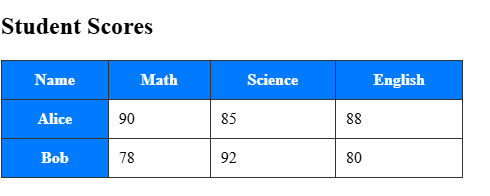
Features of this example:
<th>used for column and row headersscopeattribute for accessibility- CSS styles for readability
8. Summary
<th>= table header cell- Default style: bold, centered
- Attributes:
scope,colspan,rowspan,abbr,class,id - Use in thead, tbody, for row or column headers
- Improves structure, readability, and accessibility
Other Courses: