
Here’s a complete, detailed guide to the <pre> element in HTML, including its purpose, behavior, attributes, and examples.
1. What is the <pre> Element?
<pre>stands for preformatted text.- It is used to display text exactly as written in the HTML code, including:
- Spaces
- Tabs
- Line breaks
- Preserves white-space and formatting, unlike
<p>or<div>.
Key points:
- Block-level element
- Usually displayed in monospace font by default
- Useful for code snippets, poetry, ASCII art, tabular data
2. Syntax
<pre>
   This is preformatted text.
   Each line
       and space
   is preserved.
</pre>
3. Common Uses
3.1 Displaying Code
<pre>
function greet() {
    console.log("Hello World!");
}
</pre>
- Indentation and line breaks are preserved exactly
- Makes code readable on webpages
3.2 ASCII Art
<pre>
  /\_/\
 ( o.o )
  > ^ <
</pre>
- Spaces and line breaks are preserved
- Ideal for art or diagrams in text
3.3 Text with Fixed Formatting
<pre>
Name       Age     City
Alice      25      New York
Bob        30      London
</pre>
- Creates simple tables without
<table> - Spacing is preserved, keeping columns aligned
4. Attributes
<pre> supports global HTML attributes:
| Attribute | Description |
|---|---|
id | Unique identifier |
class | CSS class for styling |
style | Inline CSS |
title | Tooltip text |
lang | Language of content |
Example with CSS class:
<pre class="code-block">
for i in range(5):
    print(i)
</pre>

<style>
.code-block {
    background-color: #f4f4f4;
    padding: 10px;
    border-left: 4px solid #007BFF;
    font-family: monospace;
}
</style>
5. Differences Between <pre> and <p>
| Feature | <pre> | <p> |
|---|---|---|
| Preserves spaces & line breaks | ✅ | ❌ |
| Default font | Monospace | Inherits body font |
| Use case | Code, ASCII, fixed text | Normal paragraphs |
6. Using <pre> with <code>
<code>indicates program code semantically- Combine
<pre>+<code>for readable code blocks
<pre><code>
function hello() {
    console.log("Hello, World!");
}
</code></pre>
- Makes it easier to apply syntax highlighting using CSS or JS libraries (like Prism.js or Highlight.js)
7. Styling <pre> with CSS
pre {
    background-color: #f0f0f0;
    padding: 15px;
    border-radius: 6px;
    overflow-x: auto; /* horizontal scroll if content is too wide */
    font-family: Consolas, monospace;
    font-size: 14px;
}
overflow-x: autoensures long lines don’t break layoutfont-family: monospacemakes text easier to read- Can add colors, borders, shadows for highlighting code blocks
8. Example: Full Preformatted Section
<!DOCTYPE html>
<html lang="en">
<head>
<meta charset="UTF-8">
<title>Pre Element Example</title>
<style>
pre {
background: #272822;
color: #f8f8f2;
padding: 15px;
border-radius: 5px;
overflow-x: auto;
font-family: "Courier New", monospace;
}
</style>
</head>
<body>
<h1>Example of <pre> Element</h1>
<p>Normal paragraph:</p>
<p>This is a paragraph.</p>
<p>Preformatted text:</p>
<pre>
This is preformatted text.
All spaces
and line
breaks are preserved.
</pre>
<pre><code>
function add(a, b) {
return a + b;
}
</code></pre>
</body>
</html>
Output:
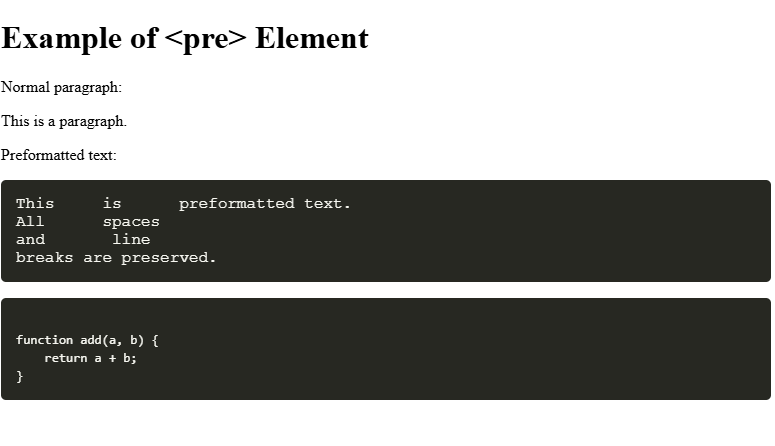
Result:
- The
<pre>section preserves all spaces and line breaks - The
<pre><code>block is ideal for code display
9. Summary
<pre>= preformatted block of text- Preserves spaces, tabs, and line breaks
- Often used for code snippets, ASCII art, tabular text
- Can be styled with CSS for readability
- Combine with
<code>for semantic code representation
Other Courses: